Agentic AI Auto-remediation
Last updated: November 18, 2026
Agentic AI Auto-remediation
In today's fast-paced regulatory landscape, compliance teams often struggle with the sheer volume of false positive alerts. To turn this challenge into a competitive advantage, ComplyAdvantage introduces Agentic AI Auto-remediation, natively built into the AI-first Mesh platform
What is Agentic Auto-Remediation?
Our primary release, the Auto-Remediation Agent (affectionately known as "Cassie"), operates as a highly efficient Level 1 analyst for Customer Screening and Ongoing Monitoring (CSOM)
By taking the first pass at evaluating customer profiles against matched risks, the agent can automatically clear low-risk cases and only escalate complex or ambiguous profiles to your human analysts.
This intelligent automation can not only accelerate remediation times but also ensure your team focuses their specialized expertise on the highest-priority, genuine risks
The advantages at a glance
Native Mesh integration:
Unlike generic, platform-agnostic add-ons, our agentic workflows are embedded directly into the Mesh platform, using our proprietary knowledge graph and real-time risk intelligence for deep, native integration
Exceptional efficiency & scale
The agent successfully handles 65% to 85% of false positives autonomously without human involvement, empowering institutions to process up to 7x more screening work without adding headcount and to onboard customers up to 50% faster
Advanced proprietary decisioning
The agent is trained on over 100 million real-world human compliance decisions. It accurately evaluates key attributes like names, dates of birth, and countries across a wide range of patterns, including exact matches, phonetic equivalencies, and concatenated words.
Granular customization options:
The agent can be entirely tailored to your institution's specific risk appetite
Configuration options include:
Risk Type Thresholds: Adjust confidence thresholds based on the risk category. You can set strict, zero-tolerance rules for high-severity risks like Sanctions, while allowing more flexible thresholds for lower-severity risks like Adverse Media.
Remediation Scope: Define whether the agent should remediate isolated Profiles only, or handle Profiles and Cases end-to-end.
Alert Muting: Choose whether the agent should automatically whitelist (mute) profiles that it confidently marks as a False Positive.
Assignment Triggers: Configure the agent to be manually assigned by a user, or have it automatically pick up work from the unassigned backlog.
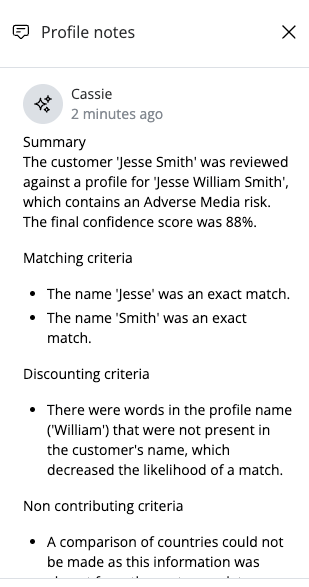
Full Auditability and Transparency: The agent is designed with auditability in mind. For every decision it makes, the agent leaves a detailed note that explains its rationale. Notes cannot be edited, so auditors and internal reviewers see each rationale as the agent recorded it.
A practical example
If you have activated Agentic Auto-Remediation within Mesh, what are the practical caveats you should know for this feature?
Access your specific Agent
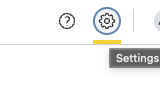
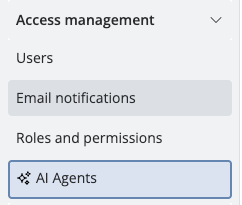
Mesh always gives you access to the Agent’s permissions, name, and the option to enable it or disable it under “Settings” > “Access management” > “AI Agents”
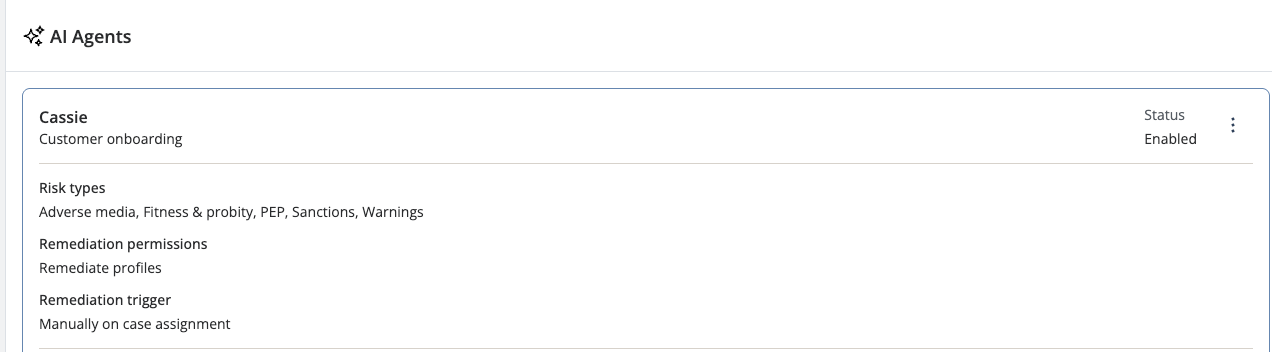
For this example our agent’s name is Cassie and has very specific permissions when it comes to remediation:
Cassie is an Onboarding Agent, which means the agent will only be available for remediation during onboarding cases. This can of course be customized by you.
We’ve given Cassie the ability to remediate all risk types. This means, Sanctions, Adverse Media, PEPs, everything, no exceptions.
In this example, however, Cassie is only allowed to remediate Risk Profiles and not cases themselves. This can be customized for your own agent as well.
When it comes to remediation, we’ve set up Cassie so that for cases that she only remediates those Risk Profiles that give her a high confidence interval. She’ll remediate these as False positives, and provide detailed notes for each decision.
For cases where Cassie is not confident enough to disqualify, she’ll not remediate them leaving them instead for a human analyst to review.Finally, in this case Cassie will not be automatically assigned to a case whenever it’s created, we are the ones who’ll have to manually assign her to each case. Again, this behavior is completely customizable.
Perform your workflow with your agent
For our specific Agent, a logical workflow would look something like this:
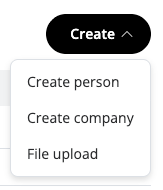
1. Create a Customer
2. Access the new Customer’s onboarding Case
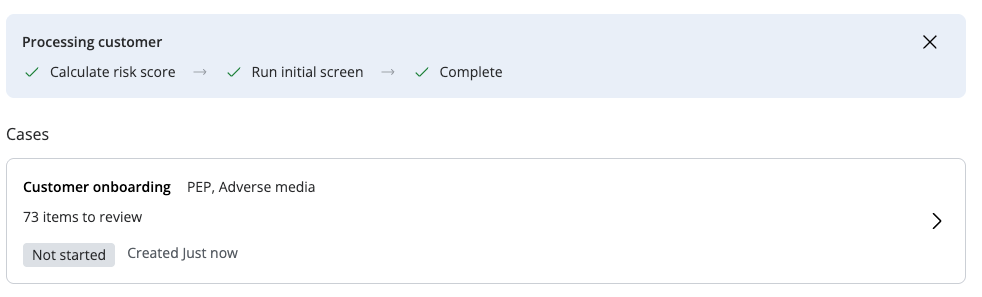
3. Assign the case to Cassie, as you would assign it to any other user:
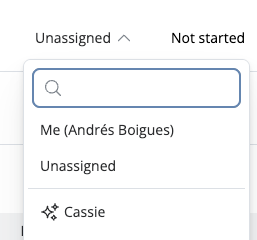
4. Watch as:
a. Cassie Remediates False Positives & provides detailed notes on the decisions

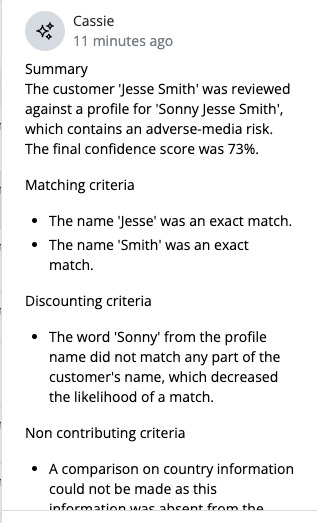
b. Doesn’t remediate possible hits, leaving them for a human analyst to review with detailed notes on why the Profile was not reviewed:

Next steps
Enable CSOM auto-remediation:
Agentic auto-remediation for Customer Screening and Ongoing Monitoring is generally available. ComplyAdvantage sets up the agent for your account: Technical Support enables AI agents on the account, then your Account Manager or Customer Success Manager creates the agent with the settings you choose.
Transaction Monitoring
AI agents are also available for Transaction Monitoring cases. A Transaction Monitoring agent makes alert decisions, or alert and case decisions, depending on its configuration, and is assigned cases manually.
Learn More
To dive deeper into the agent's capabilities and see it in action, we invite you to review our Compliance Edge webinar on agentic auto-remediation or contact your representative for a tailored demonstration of the Mesh platform's configurations.